Monday, October 26, 2015

Friday, May 15, 2015
Successfactors C_THR81_1502 Employee Central Certification Questions
SAP Successfactors C_THR81_1502 – Employee Central Certification Questions
Question:: Where
can you create associations?
Note:
There are 2 correct answers to this question.
A.
In the Configure Object Definitions tool
B.
In the Corporate Data Model
C.
In the Configure Business Rules tool
D.
In the Succession Data Model
Answer: A, B
A.
visibility
B.
pii
C.
type
D.
id
Answer: B
What
must be done in the Succession Data Model to avoid errors in the system?
A.
The Cost Center HRIS element must be set to visibility = "none".
B.
The Cost Center field in the Job Info element must be set to required =
"false".
C.
The Cost Center field in the Job Info element must be set to visibility =
"none".
D.
The Cost Center HRIS element must be set to required = "false".
Answer: C
A.
In the Manage Templates tool
B.
In the Configure Business Rules tool
C.
In the Event Reason Rules Derivation data model
D.
In the Manage Organization, Pay and Job Structures tool
Answer: D
A.
Composite association
B.
Label
C.
Valid Values Source
D.
Destination Field Value
Answer: C
You
want to create a metadata framework (MDF) object that is a composite
association of two MDF objects.
Where
do you define the association?
A.
In the Manage Data tool
B.
In the Corporate Data Model
C.
In the Configure Business Rules tool
D.
In the Configure Object Definition tool
Answer: D
Note:
There are 3 correct answers to this question.
A.
Searchable Fields
B.
Configuration UI
C.
Associations
D.
Picklist Values
E.
Security
Answer: A, C, E
For More Details on Certification Questions or Successfactors Online Training Contact us at :: saphcmsftraining@gmail.com
Tuesday, May 12, 2015
Successfactors C_THR81_1502 – Employee Central Certification Outline
C_THR81_1502 – Employee Central
Certification
Employee Central –
Certification Introduction::
1) What is the Syllabus for the Employee Central Certification?
The Syllabus for the
EC- Certification is categorized by the below topics with the percentage of
questions.
1.
Data
Models> 12%
2.
Importing and
Exporting Data> 12%
3.
Generic Objects> 12%
4.
Rules 8% - 12%
5.
Workflows 8% - 12%
6.
Foundation Objects< 8%
7.
Language Implementation< 8%
8.
Events< 8%
9.
Manage System Security< 8%
10.
Manage Employee Data< 8%
11.
Reporting < 8%
2 ) How many questions will be there in the exam?
In the EC – we will
have 80 questions.
3) What type of questions will come in the certification?
Questions will be
based on objective type with the multiple options. Candidate should choose the
correct answer from the multiple options
4) Is there any multiple answers question will be there?
Yes, Ex: If two
answers are correct for the question, then they will mention with the Note
saying that “There are two correct answers to this question “
5) Is there any negative marks for the wrong answers?
No, there is no
negative marks for the wrong answers
6) How many hours the exam?
Candidates should
complete the exam with in 180 mnts
7) What is the cut of score for this?
Cut score for this
exam is 63
8) How to get the certification Subscription?
Certification
Subscription can be purchased from the SAP (Training.sap.com). Once login to
the web – You can find the tab as certifications. In this you can subscribe for
the certification.
9) Is there any validity period for the subscription?
Yes, Certification
subscription is valid for one year. In this One year we need to complete the
all the six attempts.
10) How many times I can attend the exam, if I fail in first
attempt?
Through Certification
subscription CE0006 – we will have 6 attempts. If first attempt is fail then we
can go for next attempt.
11) Can I use the remaining attempts for the other Modules?
You can use the other
attempts for the other modules by scheduling the appointments / booking the
slot.
12) What is the mode of the exam?
Exam will be conducted
in online, Candidate can attend the exam in their house / office.
13) Who will assist at the time of writing exam in online?
Before writing an
exam, proctor will get in touch with the candidate in remotely.
14) How to get the certificate, after completion of certification?
Through Credential
Manager
15) How to pay the certification fee?
Through online from
web URL: Training.sap.com – Certification
16) What are the technical requirements of the laptop / desktop
readiness?
I mentioned the below
check list for the technical requirements of the system / laptop.
1) Question mark Secure browser that you will need to download and
install
2) Webcam
3) Microphone or headset
4) Adobe Flash
5) Broadband connection
17) How to schedule the appointments?
You can schedule the
appointment from the tab – Exam Dash Board (Make sure you are in SAP
Certification Hub Screen)
18) Is there any mail notification, after scheduling the
appointment?
Yes, after scheduling
the appointment you will get a mail notification about the exam
19) What are the prerequisites for this exam?
Yes, we need to
complete the basics / Foundations of Success Factors (Not Mandatory)
20) How to prepare the certification exam?
For preparation of
certification exam following of the options are available
A) Learning Hub HUB030 – Subscription from the SAP ( Not Mandatory
)
B) Implementation Guides
For Registration and More Information Visit following URL::
Sunday, July 27, 2014
SAP Successfactors Employee Central Mass Change Feature
SUCCESS FACTORS EMPLOYEE CENTRAL :: Mass Change Functionality
Mass Changes is a tool for HR Administrators to manage changes to employees' job information and job relationships for any user-defined selection of employees. It allows users to efficiently execute changes to employees' attributes due to manager reassignments, or reorganizations affecting large numbers of employees. Example: The HR Manager responsible for 40 employees is replaced by another person. All engineers decentralized in several departments are being centralized in a newly created unit.
The user defines a mass change in a screen consisting of:
● An employee selection using a group definition tool similar to the one that are used for permissions.
● The effective date that determines when the determined changes should take effect.
● The list of fields to be changed, including their new value.
The mass change definition can then be saved and initiated immediately or saved and initiated later. Initiating a mass change creates a background job that is scheduled for immediate execution. After mass change has run, a new status is set, dependent on the result. In the event of errors, the user can access a log to analyze the changes that failed.
The user defines a mass change in a screen consisting of:
● An employee selection using a group definition tool similar to the one that are used for permissions.
● The effective date that determines when the determined changes should take effect.
● The list of fields to be changed, including their new value.
The mass change definition can then be saved and initiated immediately or saved and initiated later. Initiating a mass change creates a background job that is scheduled for immediate execution. After mass change has run, a new status is set, dependent on the result. In the event of errors, the user can access a log to analyze the changes that failed.
1. Provisioning
- Company Settings
Select Enable Generic Objects

2. Admin – Permission to Generic Objects
Grant permission to Manage Generic Objects to Admin user.
Goto Admin Tools à
Role Based permission à
Manage Permission Roles.

3. Role Based Permissions for Mass Changes
Grant permission to Manage Mass Changes to Admin user in
Role Based Permissions FrameWork.


Select Create New
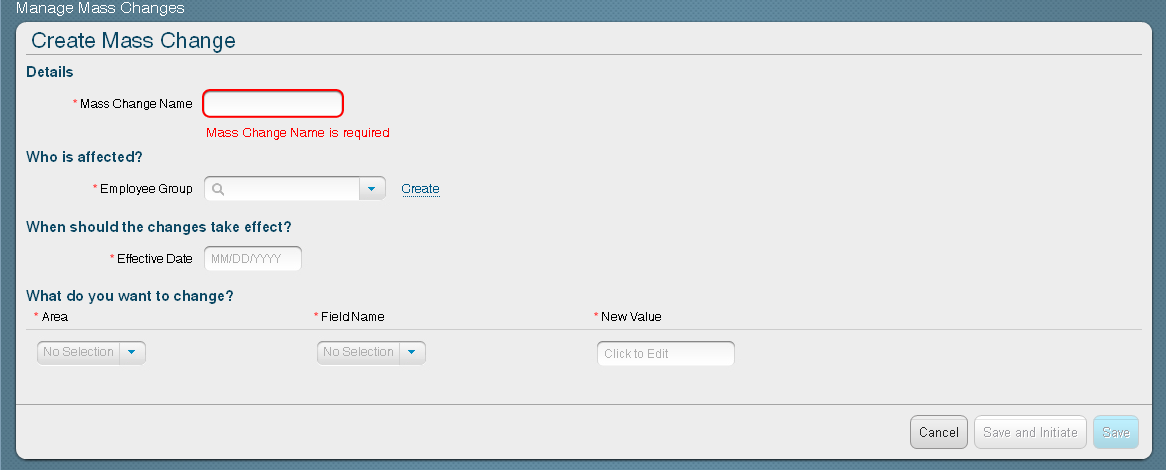
Create or Select an Employee Group.
For Job Information changes, Event Reason has to be defined
in the Mass Change definition

Saturday, July 26, 2014
SAP Successfactors Online Free Webinar On 28th July @ 10:00 PM EDT
SAP Successfactors Training/Demo
SAP SUCCESSFACTORS TRAINING PROVIDED BY CERTIFIED CONSULTANT FROM USA.
We offer SAP Successfactors Training in the below Modules::
SAP Successfactors Free Webinar is scheduled for 28th July @ 10:00 PM EDT/29th July @ 7:30 AM IST.For further details contact us at :: successfactorstrainer@gmail.com or saphcmsftraining@gmail.com
Monday, June 9, 2014
SAP Successfactors Employee Central Meta data Framework Demonstrated.
SAP Successfactors Employee Central MDF Meta Data Frame work Demonstrated.
http://youtu.be/byvdO-sbFDs
http://youtu.be/byvdO-sbFDs
Friday, April 4, 2014
SAP SuccessFactors Performance Management :: Rating Scale Creation
SAP SuccessFactors Performance
Management :: Rating Scale Creation
A Rating scale is a tool used during
the performance evaluation process to quantify a reviewer’s perspective on
performance.
Below are the Steps along with screen shots that needs to be
followed for creation of a Rating Scale::
Step1:: From
the Home Page click on Admin User Menu at the top of the screen and select
Admin, as shown in the below image.

Step2::
Navigate toAdministrationTools > CompanyProcesses&Cycles>Performance
Management.

Step3:: Select Rating Scales

Step4::
Click Create New Rating Scale.

Step5::
Select a pre--‐built rating scale or build one from scratch. Enter Labels.
Enter Descriptions for the Labels.

Step6::
Enter a Name and Description for the Rating Scale. Note: Create rating
scale names that are unique, and do not contain any symbols. Click Save

Step7:: End User View of Rating Scales::
The end
user will see the rating scales when rating performance on
competencies
during a performance review, and it looks like below.

Subscribe to:
Posts (Atom)